
Hello all, it’s time again for a roundup on what’s happening to Loc-Suite these days. Very busy days. Very busy days. Basically, I completed my Beleg (like a Bachelor Thesis) about automatic application of layout during localizations. What this means? You will never-ever-ever-again have to manually resize a nib file after localization. Okay, it’s not never, but hopefully many-times 
I have invested lots of time into this particular feature, which I think is the major (technical) problem of Mac localization. From the preview I showed in in this post, there were like a zillion of problems to be solved. Things became more complex that I imagined. However, finally it seems to work pretty well on some examples.
Here is one of these working examples:
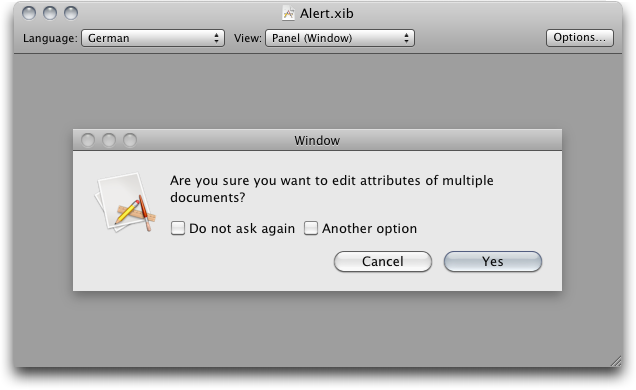
This is a preview of an interface in one of my test tools. Basically this is what you’ll also see in the Manager or Localizer. So now, let’s put in some German dummy-text:
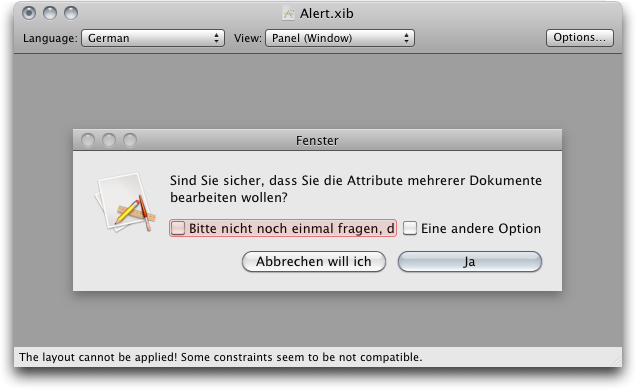
The interface has now been adjusted to fit all texts as good as possible. The former Cancel button had to extend in width and hence the Yes button had to do so, too. The approach will work with more complex windows as well, but this simple example shows the effects already quite well.
One of the things I’ve (thought of for weeks but) implemented just today is the red box you see there. I defined an arbitrary fixed width for the window. Without this definition, it would have extended in width.
I will eventually publish my work (maybe also here) and disclose the full details of how this process works. For now there’s only the user’s view. If you like, you can download a nightly build of a layout-enabled Localization Manager. As always – just go here and grab the “Localization Manager Layout”.
Next up will be to make the process ready for the big stage. There are some essential things still missing or buggy. If this is done, I will merge the layout into the main branch, publishing it to all developers.
I am pretty excited, and would love to hear some feedback.
Have fun, Max
PS: Is someone of you going to WWDC this year? I’ll be there. Maybe we can meet…